> For the complete documentation index, see [llms.txt](https://docs.seaart.ai/guide-1/llms.txt). Markdown versions of documentation pages are available by appending `.md` to page URLs; this page is available as [Markdown](https://docs.seaart.ai/guide-1/zhong-wen/2-ji-chu-gong-neng-cao-zuo/2-5-comfyui/xiao-zhi-shi.md).

# 小知识

利用这些有用的提示来提升您的 ComfyUI 使用技巧。了解如何修改节点标题、排除错误等。

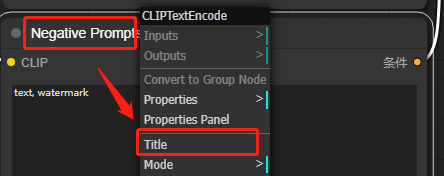
## 1. **修改节点标题**

右键单击选择Tile

<figure><img src="https://content.gitbook.com/content/I1niezbE5y99beoQQ5aL/blobs/3zHf38Hte9IrMU5bhMLt/%E6%94%B9%E6%A0%87%E9%A2%98.png" alt="Modify node title"><figcaption></figcaption></figure>

## 2. **生图出现系统取消**

<figure><img src="https://751506775-files.gitbook.io/~/files/v0/b/gitbook-x-prod.appspot.com/o/spaces%2FI1niezbE5y99beoQQ5aL%2Fuploads%2Fmp6rK5YDlK7pZOFfDrJJ%2F%E4%BC%81%E4%B8%9A%E5%BE%AE%E4%BF%A1%E6%88%AA%E5%9B%BE_20240807184715.png?alt=media&amp;token=bec37ef6-9241-49d3-9dc3-0168d8021296" alt=""><figcaption></figcaption></figure>

> **可能原因：** 1.节点是否全部连接&#x20;
>
> 2.节点顺序是否连接正确&#x20;
>
> 3.是否选择模型

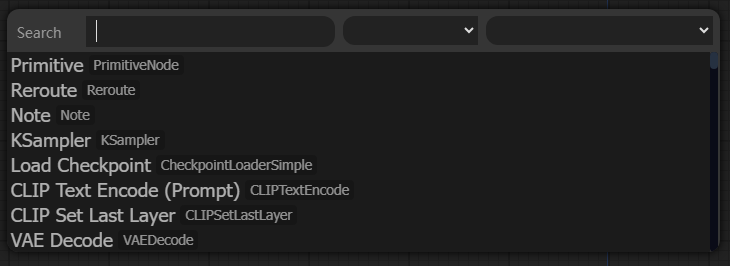
## 3. **搜索节点**

在空白处双击鼠标左键
<figure><img src="https://content.gitbook.com/content/I1niezbE5y99beoQQ5aL/blobs/6TpNoBgJLJBdGGkB816N/%E6%90%9C%E7%B4%A2%E8%8A%82%E7%82%B9.png" alt="Searching for nodes"><figcaption></figcaption></figure>

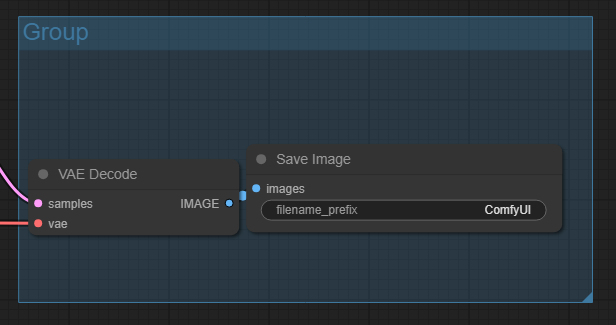
## 4. **创建组**

将多个节点创建为一组，可以一起拖动 单击右键选择Add Group，右下角拉动Group框选节点

<figure><img src="https://content.gitbook.com/content/I1niezbE5y99beoQQ5aL/blobs/irWyuLNNF1LyMY4Oq3mC/%E7%BB%84.png" alt="Create a group"><figcaption></figcaption></figure>

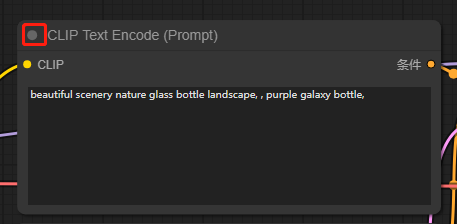
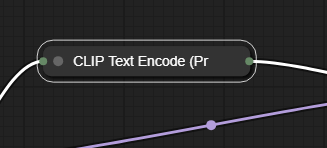
## 5. **缩小节点页面**

点击节点左上角的灰色按钮

<figure><img src="https://content.gitbook.com/content/I1niezbE5y99beoQQ5aL/blobs/4HAdpX36tq83oYdeKF8T/%E7%BC%A9%E5%B0%8F.png" alt="The grey button in the top left corner of the node" width="343"><figcaption></figcaption></figure>

<figure><img src="https://content.gitbook.com/content/I1niezbE5y99beoQQ5aL/blobs/c0n80mujjpkNR6YY17zi/%E7%BC%A9%E5%B0%8F%E5%90%8E.png" alt="CLIP Text Encode"><figcaption></figcaption></figure>

## 6.创建、保存、下载工作流

<figure><img src="https://751506775-files.gitbook.io/~/files/v0/b/gitbook-x-prod.appspot.com/o/spaces%2FI1niezbE5y99beoQQ5aL%2Fuploads%2FPeONalsunKIIkmP0SE1t%2F%E4%BC%81%E4%B8%9A%E5%BE%AE%E4%BF%A1%E6%88%AA%E5%9B%BE_20240807185536.png?alt=media&amp;token=d1bb6bc8-8ba9-47f7-b68b-dbac143aab03" alt=""><figcaption></figcaption></figure>

<figure><img src="https://751506775-files.gitbook.io/~/files/v0/b/gitbook-x-prod.appspot.com/o/spaces%2FI1niezbE5y99beoQQ5aL%2Fuploads%2FXkhMsBesEN1wEJaLvyNv%2F%E4%BC%81%E4%B8%9A%E5%BE%AE%E4%BF%A1%E6%88%AA%E5%9B%BE_20240807185547.png?alt=media&amp;token=984c8505-fd68-4a3b-b351-56317fa70f8f" alt="" width="292"><figcaption></figcaption></figure>