# Apps de IA en Swift

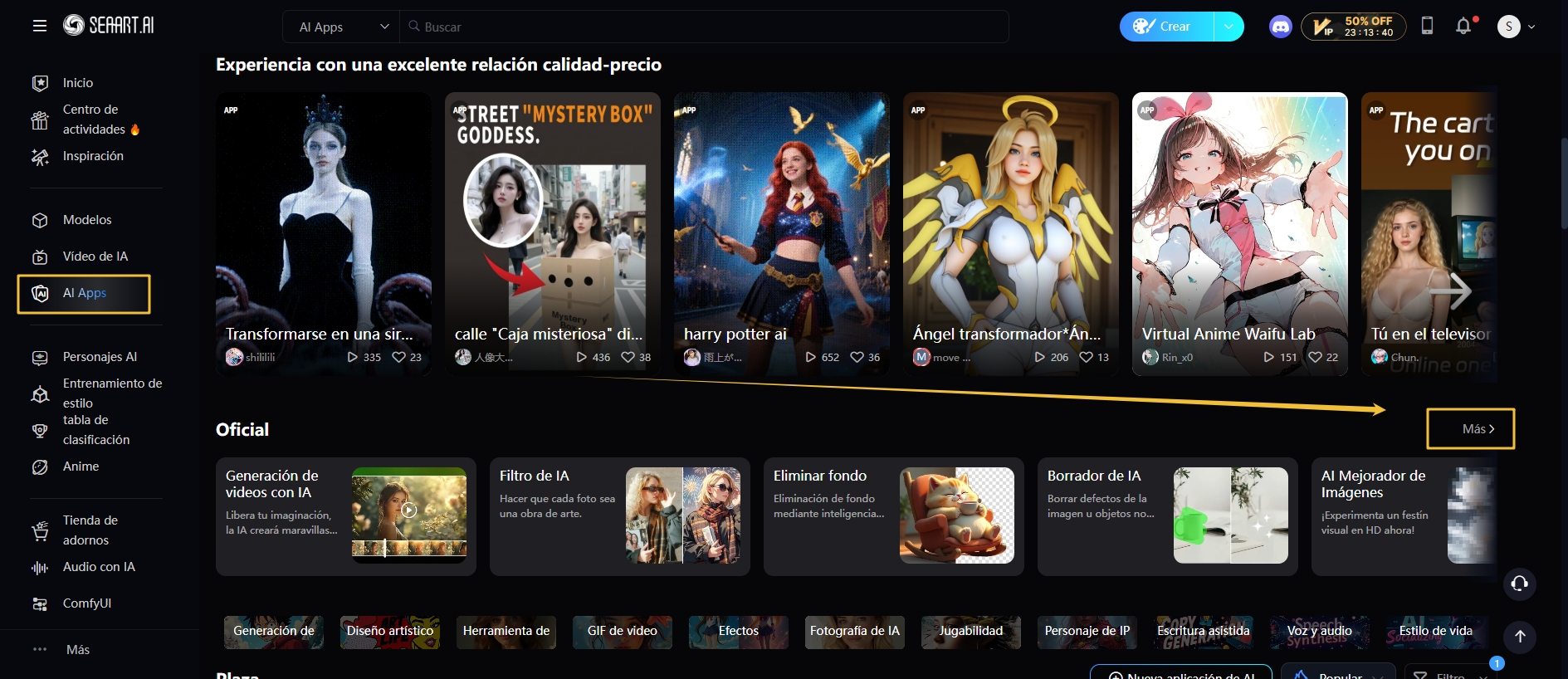
**Entrada a la página:** Haz clic en "AI Apps - Más"

Aquí hay algunas herramientas de IA creadas oficialmente:
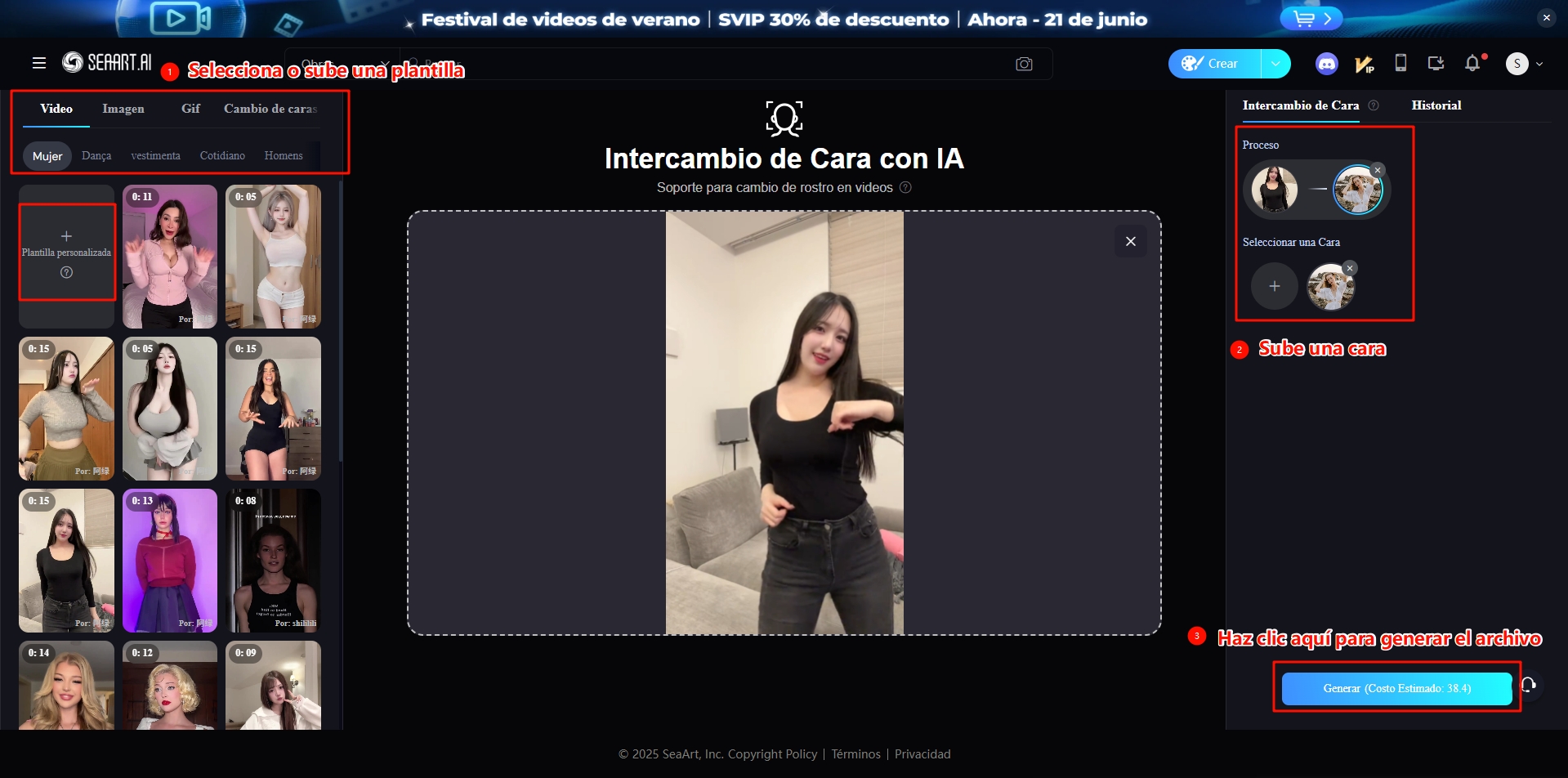
### [Intercambio de caras con IA](https://www.seaart.ai/es/ai-tools/ai-face-swap)

Soporta <mark style="color:red;">intercambio de caras en video y imagen</mark>.

**Proceso operativo:**

**Paso 1:** Selecciona o sube una plantilla.

**Paso 2:** Sube un rostro.

**Paso 3:** Haz clic en Generar.

<figure><img src="https://content.gitbook.com/content/1y3zrHPB2l8reoeyLIjC/blobs/VaX7gxKzklZUGuwlpLOU/image.png" alt=""><figcaption></figcaption></figure>

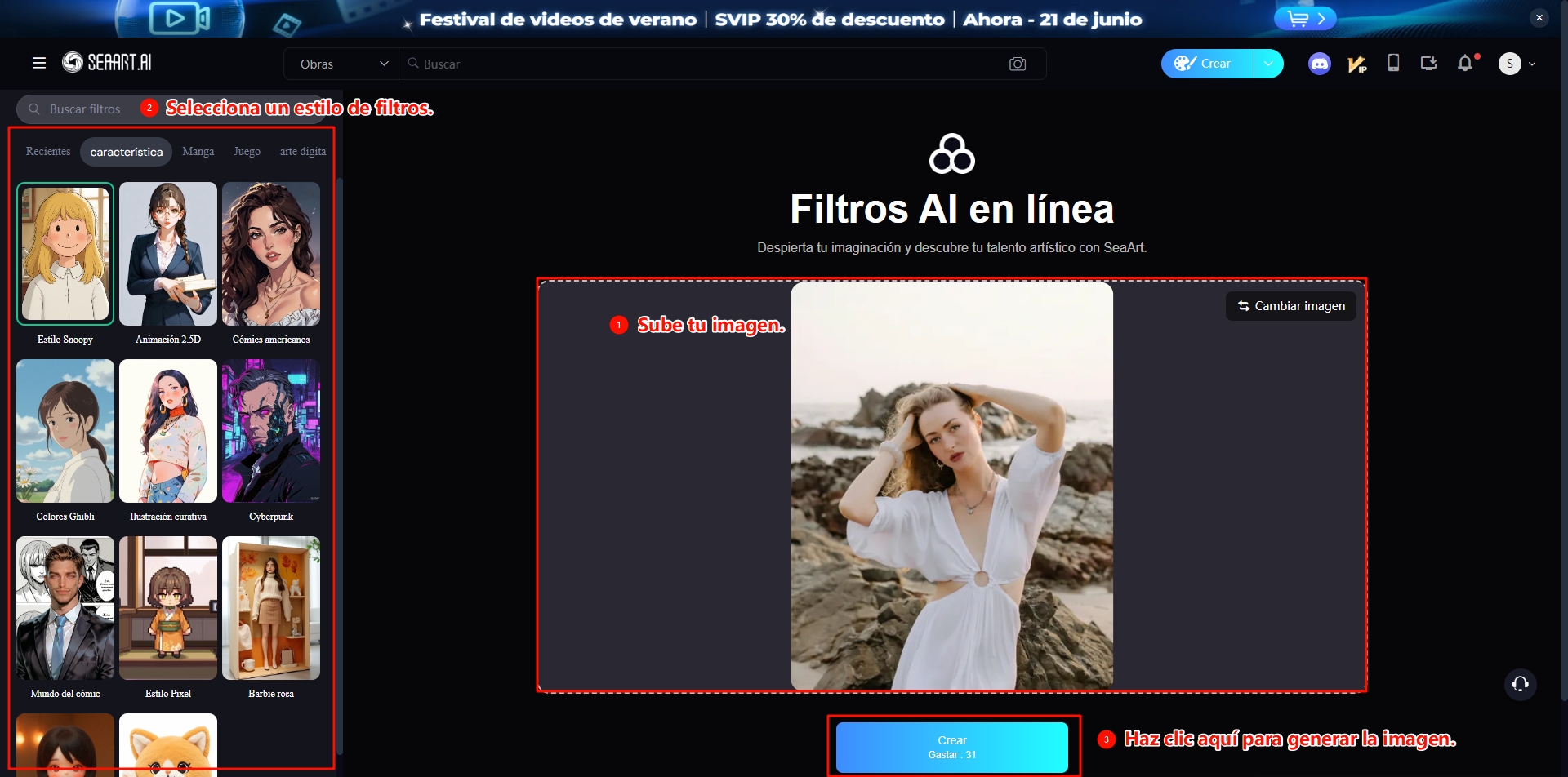
### [**Filtros de IA**](https://app.gitbook.com/s/igAtVLBrlaI8jVruJfC8/)

Aplica múltiples transferencias de estilo en una imagen.

**Proceso operativo:**

**Paso 1:** Sube una imagen.

**Paso 2:** Selecciona cualquier estilo de filtro en el lado derecho.

**Paso 3:** Haz clic en Generar.

<figure><img src="https://content.gitbook.com/content/1y3zrHPB2l8reoeyLIjC/blobs/MENi9FFlNgh6YSHAPCK5/image.png" alt=""><figcaption></figcaption></figure>

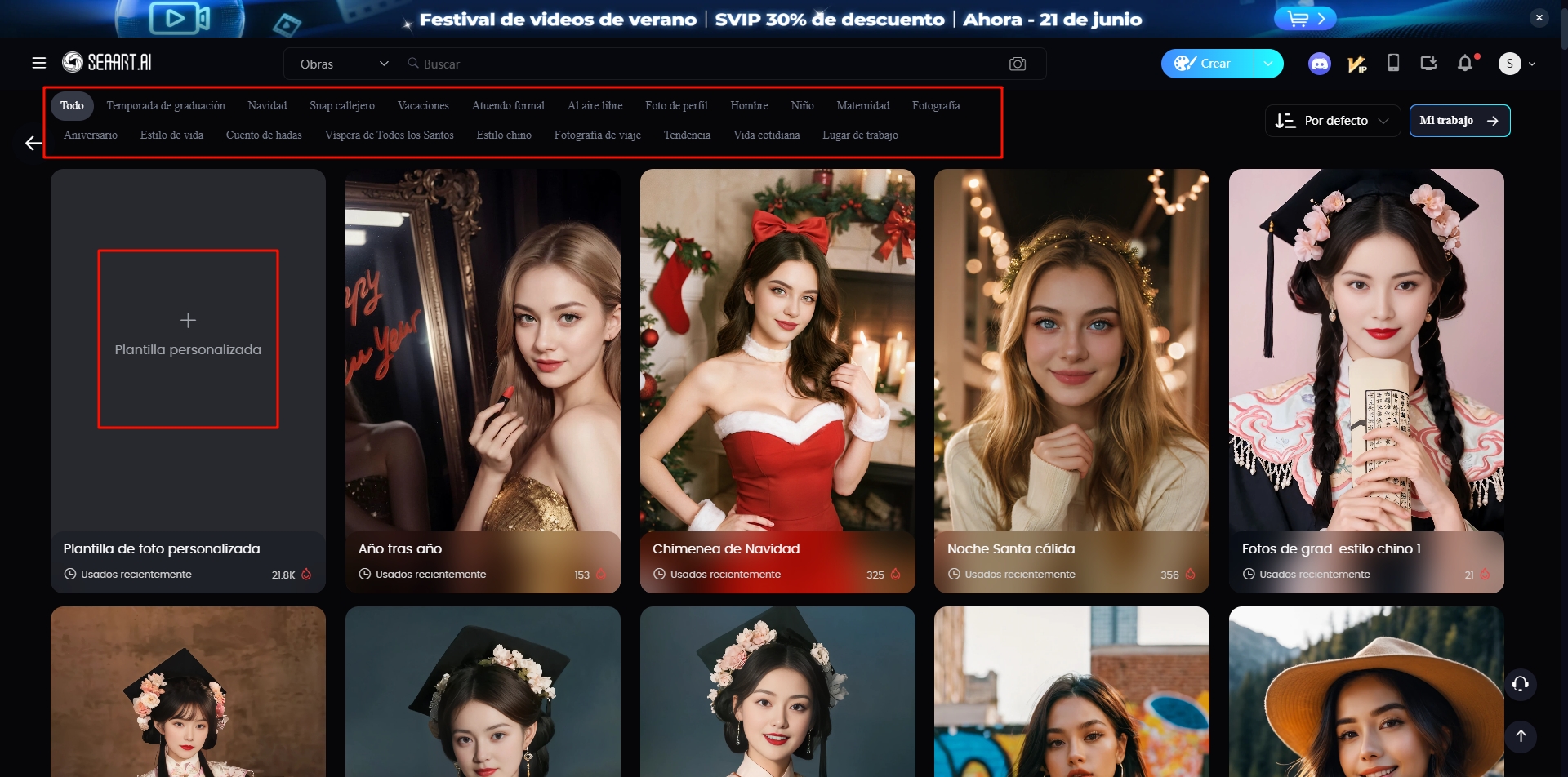
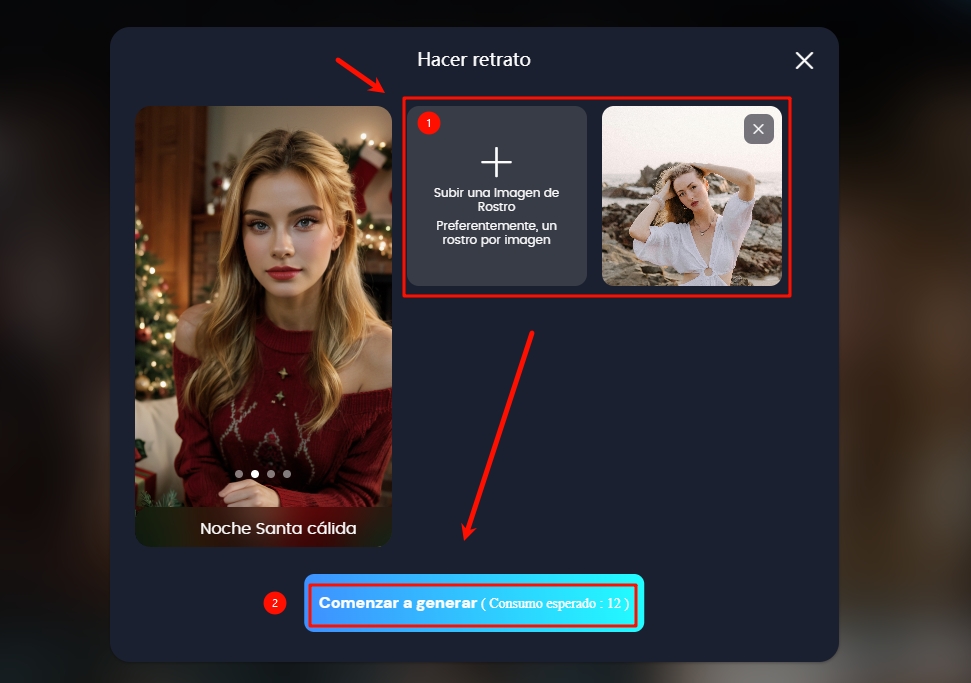
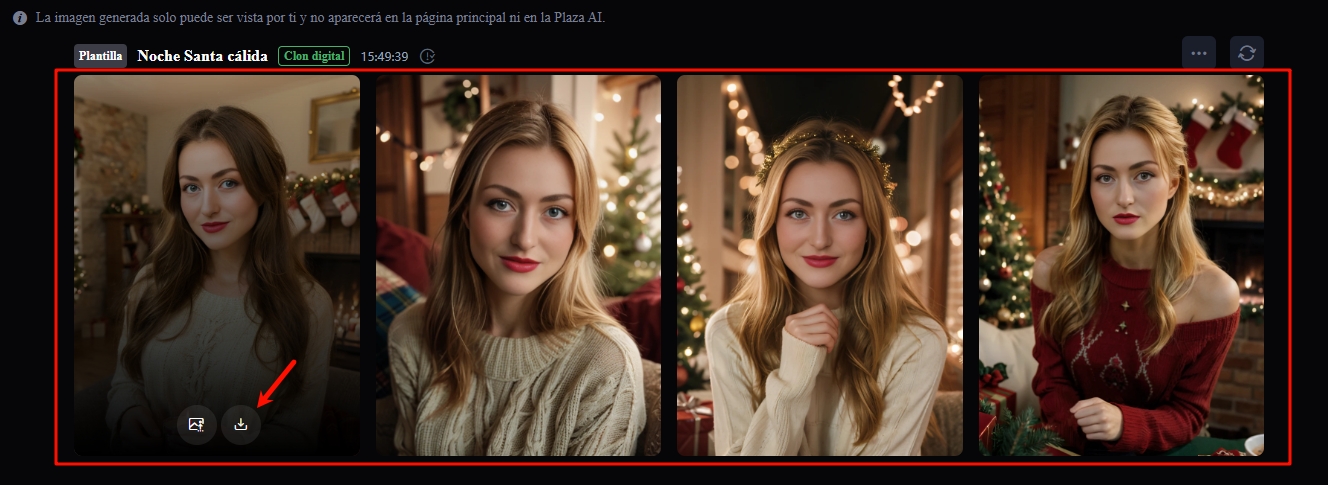
### [Retrato con IA](https://www.seaart.ai/es/ai-tools/ai-portrait)

Personaliza tu retrato exclusivo con solo una imagen.

**Proceso operativo:**

**Paso 1:** Sube o selecciona cualquier plantilla de retrato.

**Paso 2:** Sube una imagen facial.

**Paso 3:** Haz clic en Generar.

<figure><img src="https://content.gitbook.com/content/1y3zrHPB2l8reoeyLIjC/blobs/zH0KoRkZQtLvtdL6hVhu/image.png" alt=""><figcaption></figcaption></figure>

<figure><img src="https://content.gitbook.com/content/1y3zrHPB2l8reoeyLIjC/blobs/zGcwwtHB2Wrqcj2FntkN/image.png" alt=""><figcaption></figcaption></figure>

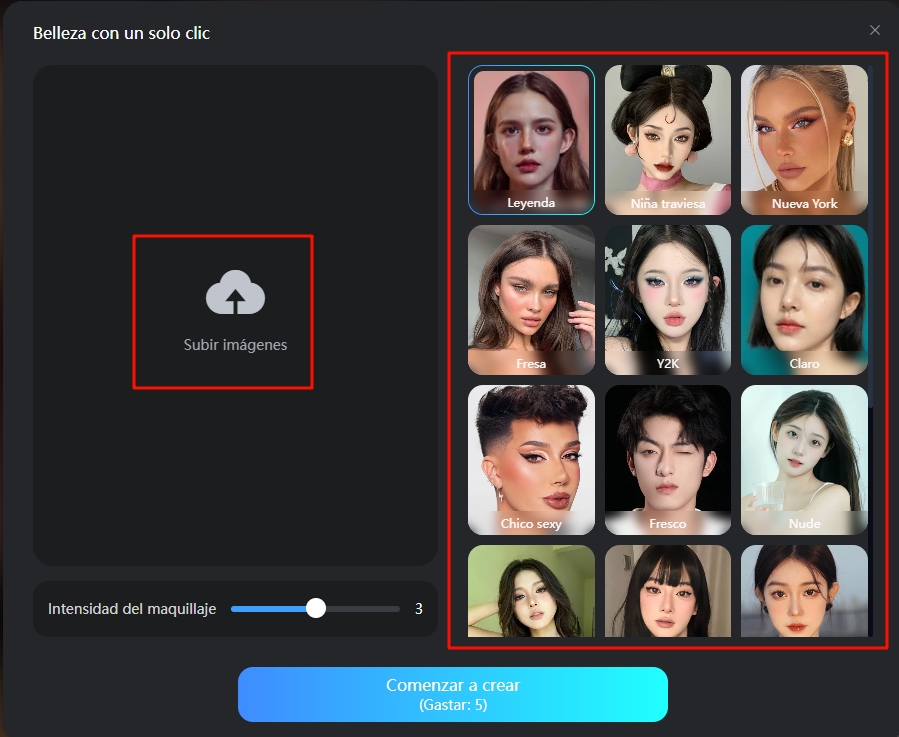
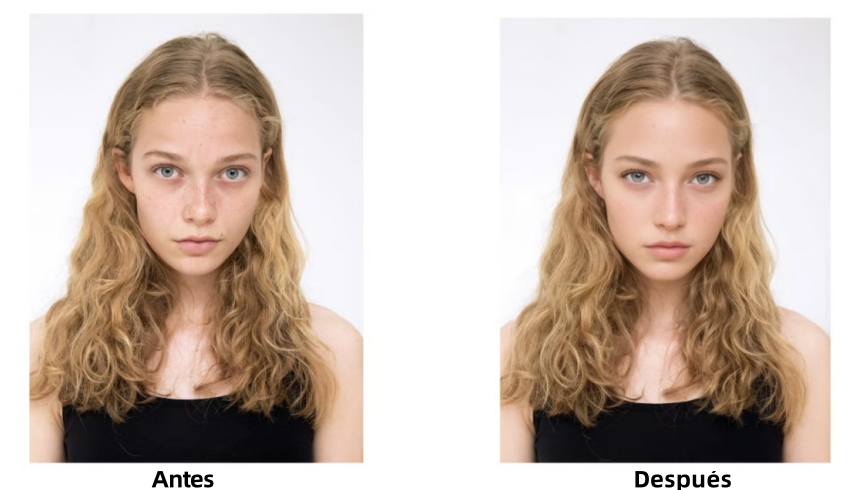
### [Maquillaje con IA](https://www.seaart.ai/es/ai-tools/ai-makeup)

Embellece tu imagen con un solo clic, logrando una serie de efectos como suavizado y maquillaje.

**Proceso operativo:**

**Paso 1:** Elige cualquier estilo de maquillaje.

**Paso 2:** Sube tu imagen (puedes cambiar el estilo de maquillaje en el lado derecho).

**Paso 3:** Ajusta la intensidad del maquillaje.

**Paso 4:** Haz clic en Generar.

<figure><img src="https://content.gitbook.com/content/1y3zrHPB2l8reoeyLIjC/blobs/5PKopnxBTN8i90emYVsP/image.png" alt=""><figcaption></figcaption></figure>

<figure><img src="https://content.gitbook.com/content/1y3zrHPB2l8reoeyLIjC/blobs/OCuekSqoPaqLnLbd03pb/image.png" alt="Comparación del antes y el después del Maquillaje AI" width="563"><figcaption></figcaption></figure>

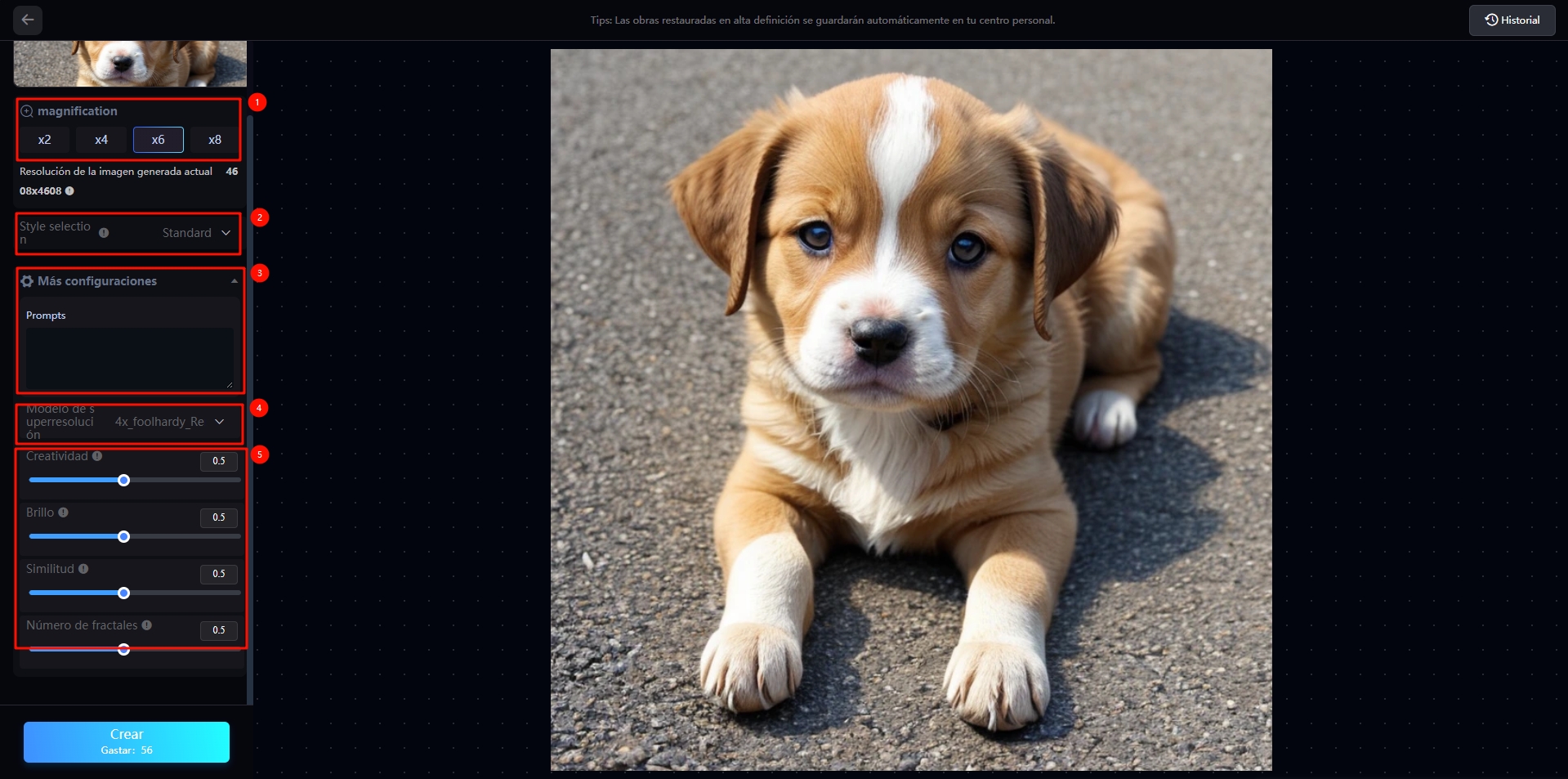
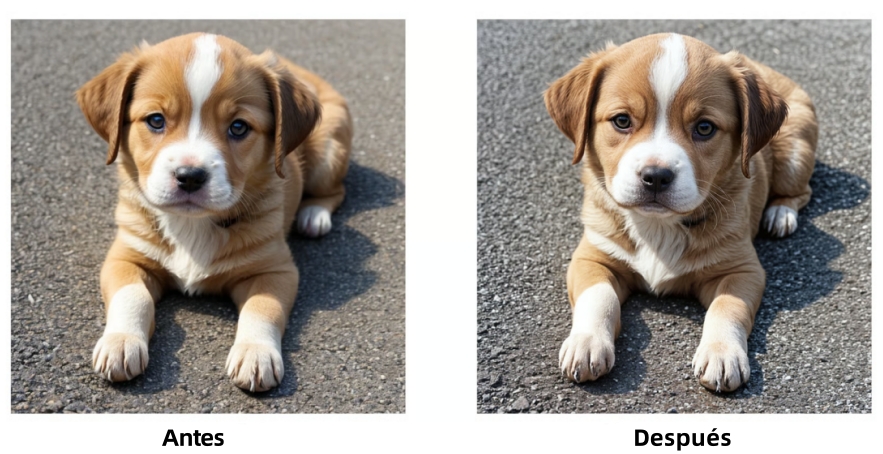
### [Mejorador de imagen con IA](https://www.seaart.ai/es/ai-tools/image-upscaler)

Reduce el ruido, mejora los detalles y optimiza los efectos visuales.

**Proceso operativo:**

**Paso 1:** Sube la imagen original.

**Paso 2:** Configura los parámetros relevantes.

**Paso 3:** Haz clic en Generar.

<figure><img src="https://content.gitbook.com/content/1y3zrHPB2l8reoeyLIjC/blobs/LVD55NGjF2WymPOqgtKm/image.png" alt=""><figcaption></figcaption></figure>

<figure><img src="https://content.gitbook.com/content/1y3zrHPB2l8reoeyLIjC/blobs/689fkbsn17bhOkA0ntVv/image.png" alt=""><figcaption></figcaption></figure>

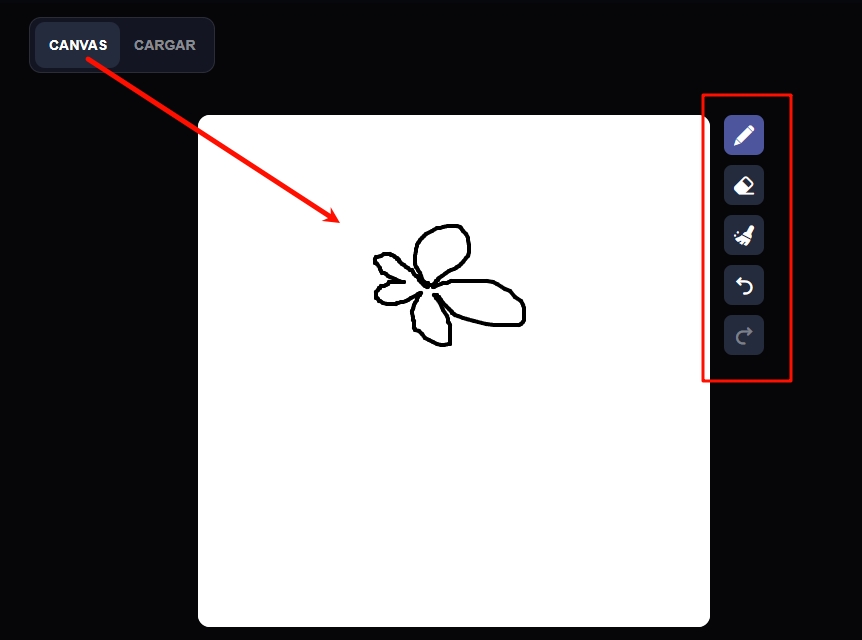
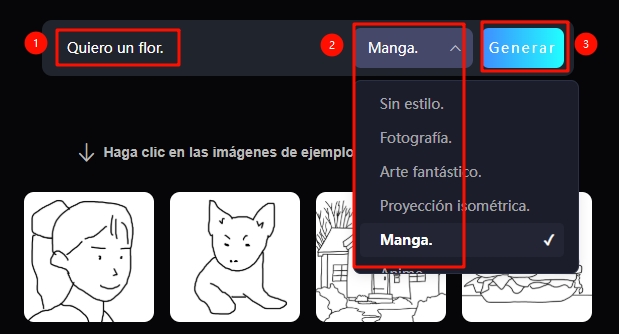
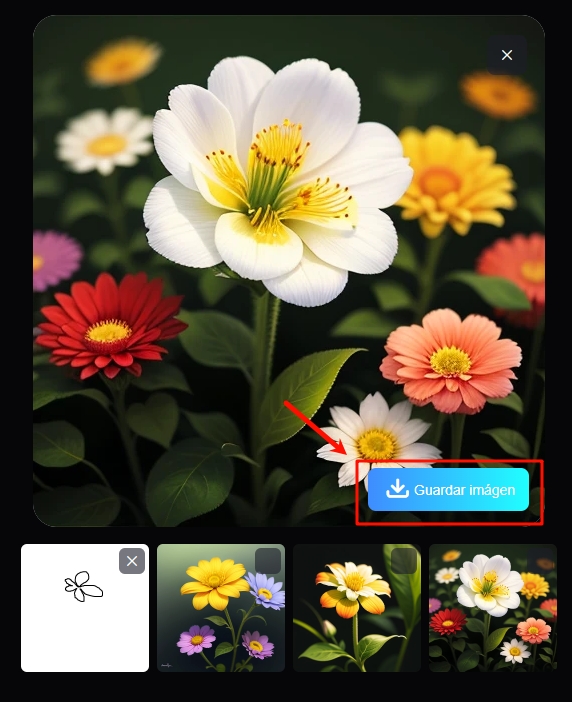
### [Boceto a imagen](https://www.seaart.ai/es/ai-tools/scribble2img)

Convierte unos pocos trazos en una obra de arte exquisita.

**Proceso operativo:**

**Paso 1:** Dibuja o sube un borrador en el lienzo.

**Paso 2:** Introduce los prompts correspondientes, selecciona un estilo.

**Paso 3:** Haz clic en Generar.

<figure><img src="https://content.gitbook.com/content/1y3zrHPB2l8reoeyLIjC/blobs/SHTNyUky9qhkr1ThUWCa/image.png" alt="" width="563"><figcaption></figcaption></figure>

<figure><img src="https://content.gitbook.com/content/1y3zrHPB2l8reoeyLIjC/blobs/MYPY8Qpq33SkpEm7s3PY/image.png" alt="" width="464"><figcaption></figcaption></figure>

<figure><img src="https://content.gitbook.com/content/1y3zrHPB2l8reoeyLIjC/blobs/8uarncPtF9qmVtqRnvsB/image.png" alt="" width="286"><figcaption></figcaption></figure>

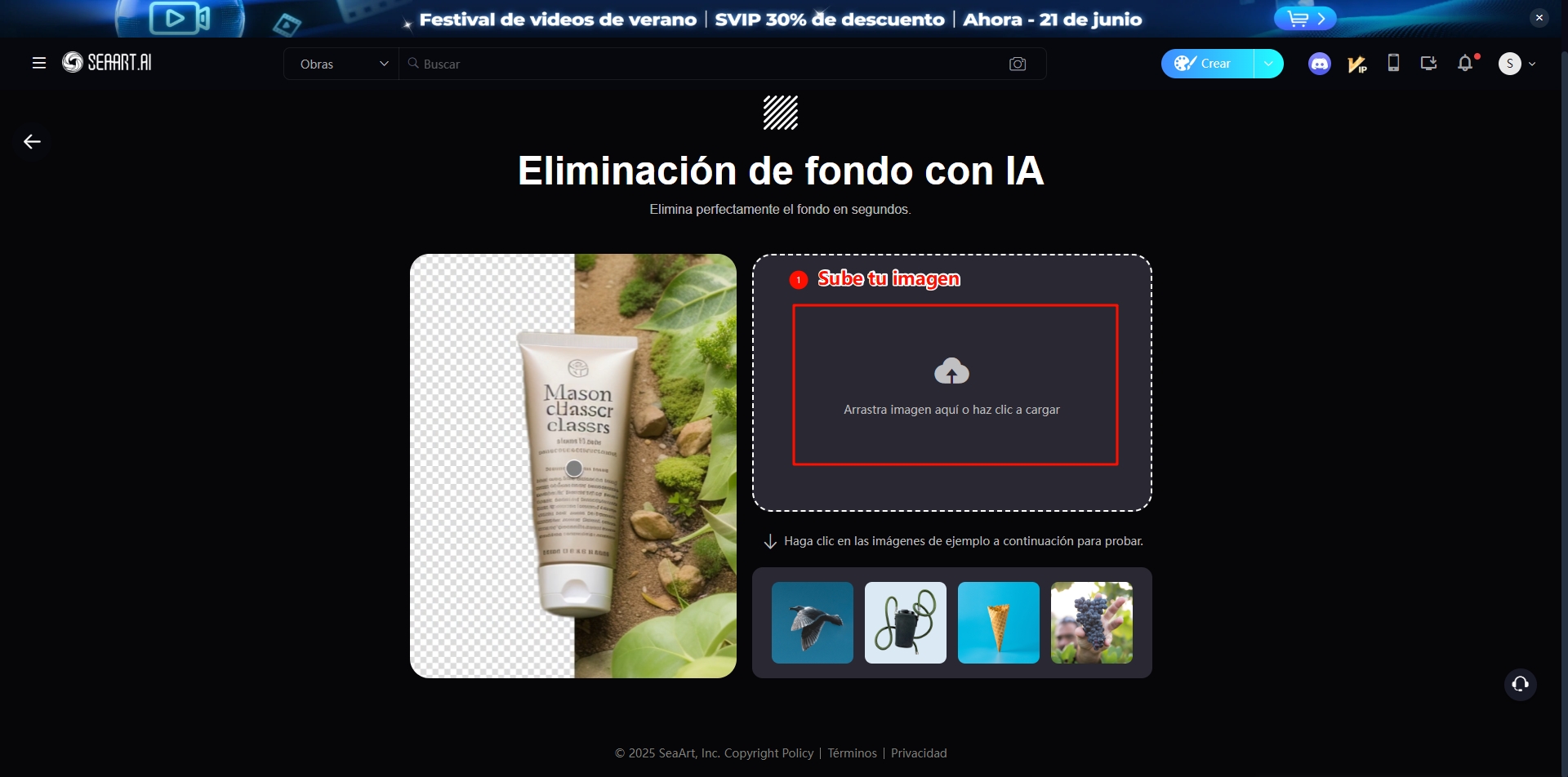
### [Eliminar fondo de imagen](https://www.seaart.ai/es/ai-tools/remove-background)

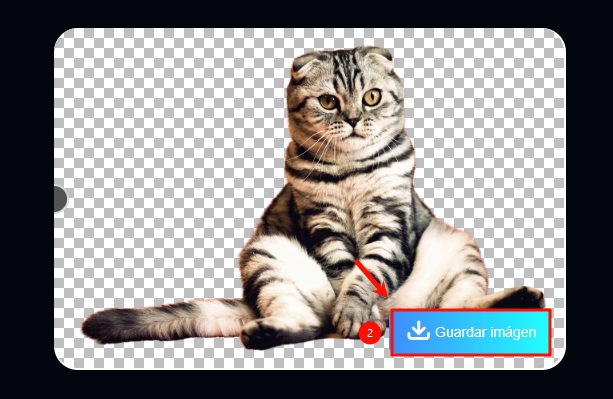
Elimina inteligentemente el fondo de la imagen y genera imágenes en formato PNG.

**Proceso operativo:**

**Paso 1:** Sube una imagen.

**Paso 2:** Haz clic para descargar la imagen.

<figure><img src="https://content.gitbook.com/content/1y3zrHPB2l8reoeyLIjC/blobs/wsEjGqOI2rif0RlRGKup/image.png" alt=""><figcaption></figcaption></figure>

<figure><img src="https://content.gitbook.com/content/1y3zrHPB2l8reoeyLIjC/blobs/1Ja3houOyv1cmajQqT9o/image.png" alt=""><figcaption></figcaption></figure>